Invoice Configuration controls the branding and legal details that appear on every invoice sent to your customers. When a customer is billed for their Growth Plan, they receive an invoice that represents your agency — not Growbotik. Completing this section ensures every invoice is professional, accurate, and legally complete from the first transaction.
The Invoice Design section sets the visual and contact details on your invoices.
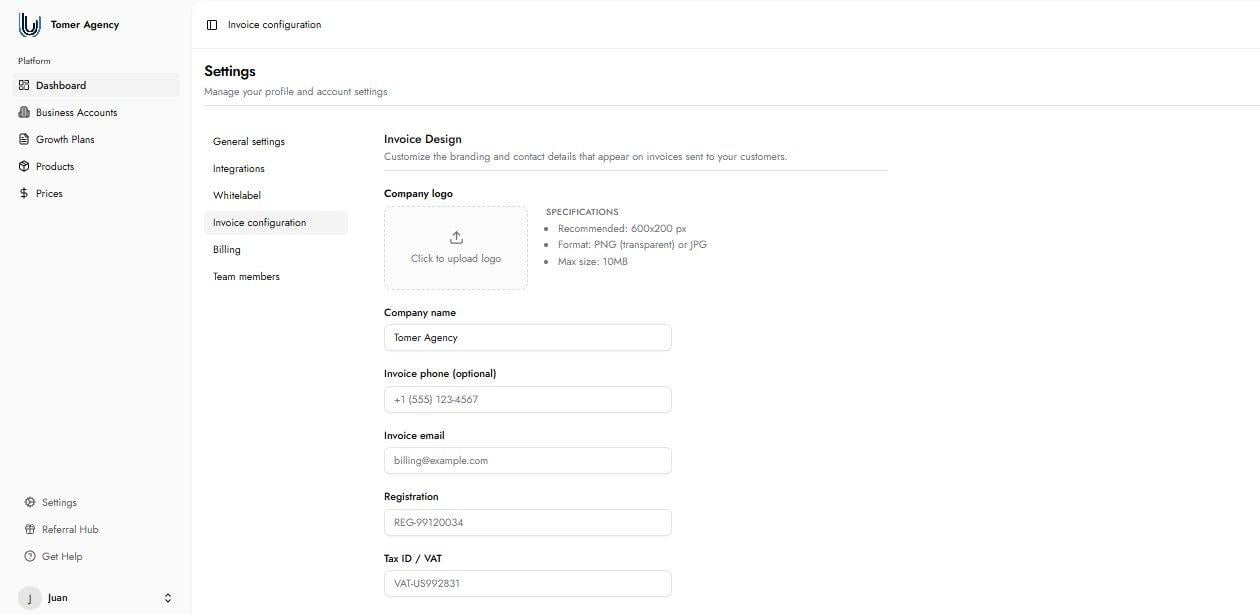
Company Logo: Your agency logo as it appears on invoices. Recommended size is 600x200px. Accepted formats are PNG (transparent) or JPG, with a maximum file size of 10MB. If no logo is uploaded, only your company name appears on the invoice. Optional.
Company Name: Your agency's name as it appears on invoices. This should be your real company name, not a DBA.
Invoice Phone: A phone number displayed on the invoice for customer reference. Optional.
Invoice Email: The email address displayed on invoices. This field is required.
Registration: Your business registration number, if applicable. Optional.
Tax ID / VAT: Your tax identification number or VAT number, if applicable. Optional.
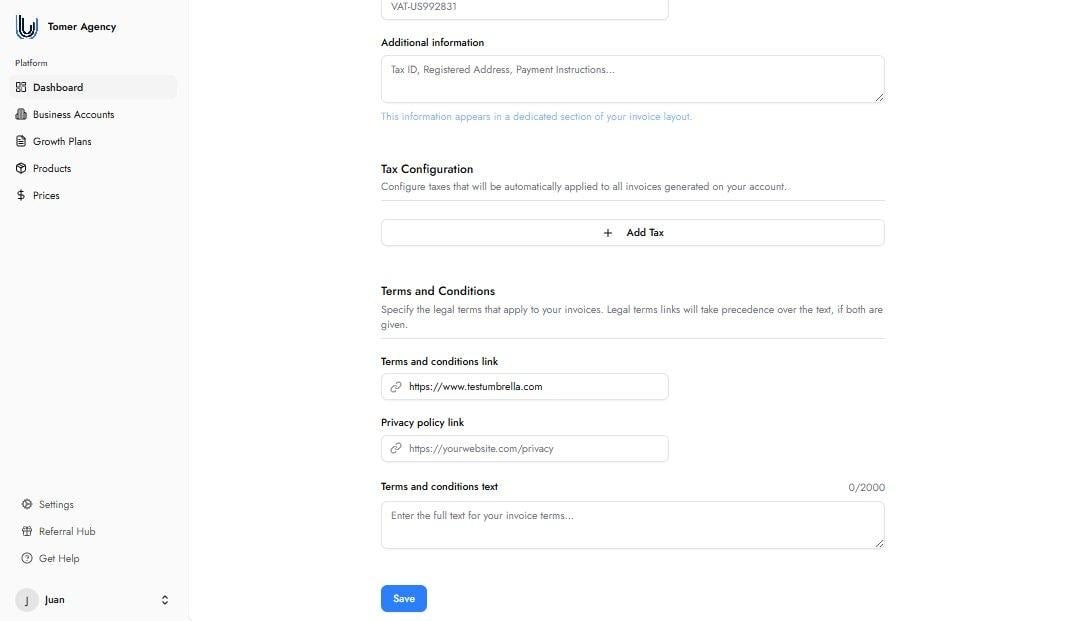
Additional Information: Any further details you want to appear in a dedicated section of the invoice layout — for example, payment instructions, registered address, or other relevant notes. Optional.
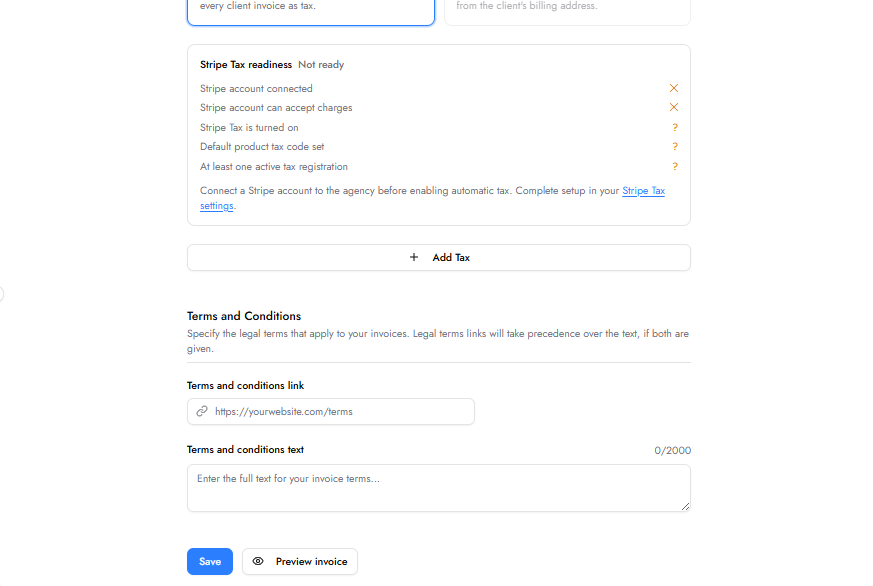
The Preview Invoice button — located at the bottom of the Invoice Configuration page alongside the Save button — generates a fully rendered preview of your invoice as it will appear to your customers. Use it at any time to verify that your logo, company details, tax configuration, and terms and conditions display correctly before any invoice is sent. No changes are required to use the preview — it reflects whatever is currently saved in your Invoice Configuration.
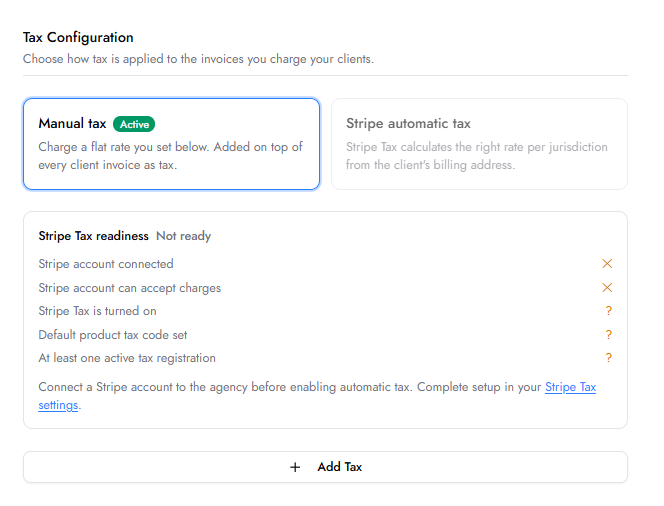
The Tax Configuration section allows you to add taxes that are automatically applied to all invoices generated on your account. Click the + Add Tax button to configure any applicable state, regional, or other taxes.
Stripe automatic tax calculates the correct tax rate per jurisdiction based on the client's billing address and applies it to every invoice automatically. Before enabling this option, five readiness requirements must be met: Stripe account connected, Stripe account able to accept charges, Stripe Tax turned on, a default product tax code set, and at least one active tax registration configured. Complete the setup in your Stripe Tax settings. Until all requirements are met, the status shows as "Not ready."
The Terms and Conditions section lets you specify the legal terms that appear on your invoices. You can provide these as a link or as direct text. If both are provided, the link takes precedence.
Terms and Conditions Link: A URL pointing to your terms and conditions page. Takes precedence over the text field if both are provided. Optional.
Privacy Policy Link: A URL pointing to your privacy policy page. Optional.
Terms and Conditions Text: The full text of your terms and conditions entered directly. Maximum 2,000 characters. Used only if no link is provided. Optional.
A ready-to-use Terms & Conditions template is available for download below. The template covers all Growbotik products and services — including SEO, PPC, Near Me SEO, Google Local Service Ads, AI Chatbot, AI Voice Agent, Business Listings, and Website Accessibility — with service-specific sections and legally relevant provisions for each.
Before using the template, you must replace all highlighted placeholders with your own agency details. The placeholders to complete are:
[Agency Legal Name] — your registered business name.
[State of Formation] — the state where your business is registered.
[Entity Type] — your business structure, for example LLC or Inc.
[Agency Brand / DBA] — your trading name if different from your legal name.
[Provider Home State] — the state that governs your agreements.
[Provider Home County, State] — the county and state for dispute resolution venue.
[Provider Legal Notice Email] — the email address for legal notices.
[Provider Mailing Address] — your mailing address for legal notices.
[Effective Date] — the date the terms come into effect.
Once completed, publish the terms on your agency website and paste the URL into the Terms and Conditions Link field in Invoice Configuration. This ensures the terms appear on every invoice you send.
This template is provided as a starting point and does not constitute legal advice. You are solely responsible for ensuring your terms and conditions are appropriate, complete, and legally valid for your business and jurisdiction. Review the template carefully and make any adjustments necessary before publishing it.
⬇ Download Terms & Conditions Template
What happens if I do not upload a logo?
If no logo is uploaded, your company name appears as plain text on all invoices. Adding a logo is strongly recommended for professionalism and brand consistency.
Can I update Invoice Configuration after customers have already been billed?
Yes. Changes to Invoice Configuration take effect on all subsequent invoices. Previously issued invoices are not affected.
Is the Invoice Email field required?
Yes. The invoice email is required and appears on every invoice as a contact point for billing questions or disputes. Use a monitored business inbox.
Do I need a lawyer to use the T&C template?
Growbotik does not provide legal advice and cannot answer this question on your behalf. The template is provided as a starting point based on the services Growbotik offers. Whether you need legal review before publishing depends on your business, jurisdiction, and the nature of your client relationships. You are solely responsible for your published terms and conditions.
Can I edit the template after downloading it?
Yes. The template is a fully editable Word document. Download it, replace all placeholders with your own details, make any additional changes you need, and then publish it on your website before linking it in Invoice Configuration.
Is there a privacy policy template?
The Terms and Conditions template we provide also covers privacy policy basics. We are not legal advisors — please review it carefully and edit it to fit your business before publishing.