
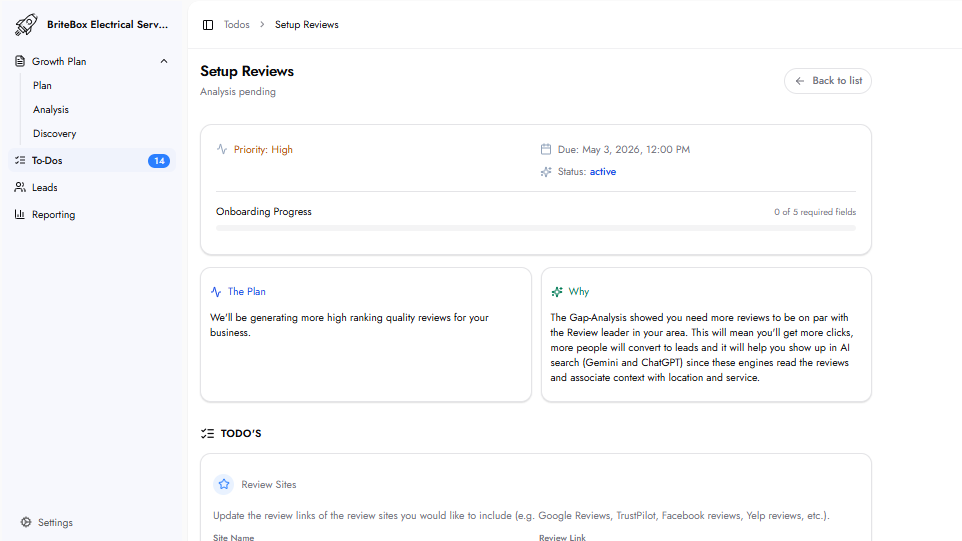
The Plan
This task sets up an automated review generation system that sends review requests to customers after each completed job. The goal is to build a consistent pipeline of high-quality reviews on relevant platforms.
Why This Matters
Online reviews are a major conversion factor for local service businesses. The Gap Analysis identifies how many reviews are needed to match or exceed competitors and which platforms are most impactful.
An automated review system removes the need for manual follow-up and ensures every satisfied customer has the opportunity to leave feedback.
Required Fields
Review Platform
Site Name
The name of the review platform. Google Reviews is included by default. Additional platforms can be added depending on the industry (e.g., Yelp, Zocdoc, Tripadvisor).
Review Link
The direct URL where customers can leave a review. This link takes users straight to the review page for quick submission.
Branding
Company Logo
The business logo used in review request messages to maintain a consistent and professional appearance.
Complaint Handling
Complaint Email: The email address where private complaints are directed.
If a customer prefers not to leave a public review, they are redirected to contact the business privately. This allows issues to be resolved while protecting public ratings. Multiple email addresses can be added if needed.
Review Request Timing
When to Send: Defines when review requests are sent:
Immediately upon payment
After a specified number of days
Timing should align with when the service is fully completed. For longer projects, a delay ensures feedback reflects the completed experience.
What Happens Next
The review generation system is configured using the submitted details.
Automated review requests begin sending based on the selected timing.
Frequently Asked Questions
Is Google Reviews required?
Google Reviews is included by default due to its impact on local visibility and search rankings. Additional platforms are optional.
What happens if a customer prefers to complain instead of leaving a review?
The system redirects dissatisfied customers to a private complaint channel using the provided email, allowing issues to be addressed before a public review is posted.
Can multiple review platforms be used?
Yes. Additional platforms can be included based on industry relevance and customer behavior.