
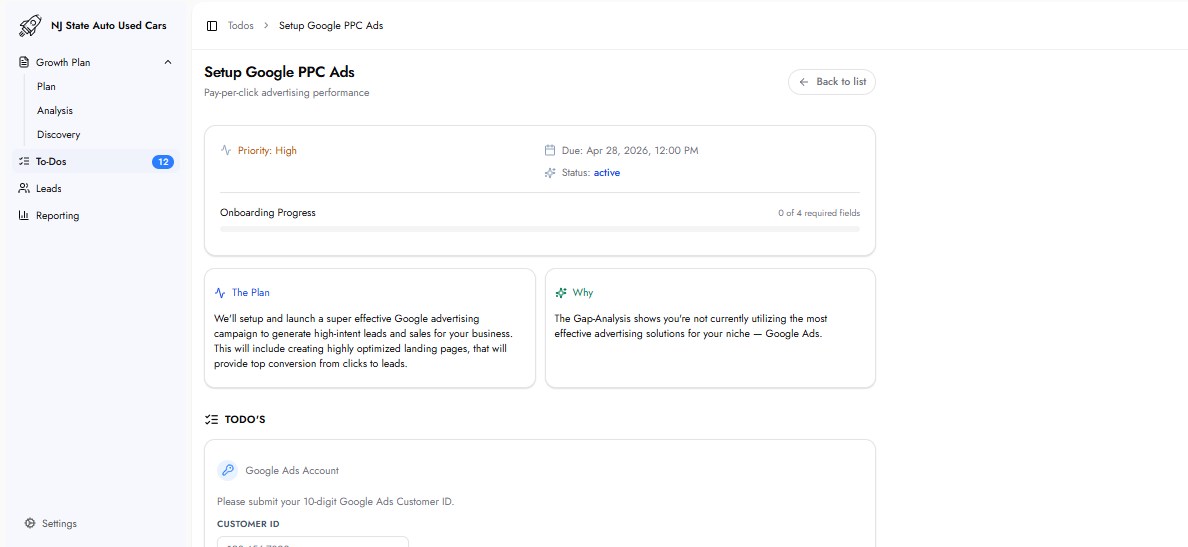
The Plan
This task sets up and launches a Google Ads campaign designed to generate high-intent leads and sales. The setup includes creating a keyword list tailored to the services and service area, building optimized landing pages on the website, and configuring the campaign for maximum conversion from click to lead.
Why This Matters
Google PPC Ads places the business directly in front of people actively searching for those services at the moment they are ready to hire. For businesses not currently running optimized Google Ads campaigns, the Gap Analysis highlights significant opportunity to capture high-intent search traffic that would otherwise go to competitors.
Optimizing ad quality — including relevance, urgency, CTAs, and trust signals — improves click-through rate and increases the number of leads generated from the same ad budget.
Required Fields
Google Ads Account
Customer ID
The 10-digit Google Ads Customer ID, formatted as XXX-XXX-XXXX. Found in the Google Ads dashboard (ads.google.com) in the top-right corner after logging in.
If a Google Ads account does not exist, the To-Do includes a "Click here to create one" link. Account creation is free, and the Customer ID is available immediately after setup.
Website Backend Access
Backend Login URL
The URL of the website’s admin or backend login page (e.g. https://yourwebsite.com/wp-admin).
Username / Email
The admin username or email address used to log into the website backend.
Password
The admin password. All credentials are encrypted at rest and used only to create landing pages and install the tracking pixel.
What Happens Next
A keyword list is provided — this is researched during the Gap Analysis phase and shared for review within a few business days.
Once the keyword list is confirmed, campaign setup and landing page creation begin.
Landing pages are shared for review and approval before going live.
After approval, the campaign launches and begins generating leads.
Live performance data becomes available in the Reporting section of the Customer Hub.
Frequently Asked Questions
Are the keywords approved before the campaign goes live?
Yes. A full keyword list is provided for review and feedback before campaign setup begins. The campaign does not go live without approval.
Are landing pages approved before launch?
Yes. Landing pages are shared for review and approval before the campaign goes live.
What if there is no Google Ads account?
The To-Do includes a "Click here to create one" link. Creating a Google Ads account is free, and the Customer ID is available immediately after account creation.
What happens if incorrect information is submitted?
Once submitted, the To-Do cannot be modified.