Growth Plans is the section of the Partner Hub that displays every prospect or business that has gone through the Growbotik chat and clicked "Create My Marketing Plan." Each record represents a complete marketing analysis generated for that business — whether or not they have become an active client yet.
This section gives you a real-time view of your pipeline. You can see exactly where each prospect stands, review everything they received during their analysis, and use that information to follow up with precision and close more effectively.
Growth Plans is accessible from the left navigation of the Partner Hub. Each business that has completed the chat and generated a marketing plan appears here as a card displaying:
Business name, website, address, and phone number.
Current ROI — the estimated return on investment based on their existing marketing setup.
Projected ROI — the estimated return achievable with Growbotik's optimization.
Desired Monthly Revenue Growth — the revenue goal the prospect entered during the chat.
Use the search bar at the top to find any business by name. Each card has a View button on the right to open the full plan detail for that business. The list is paginated — use the Previous, Next, and page number controls at the bottom to navigate across multiple pages.
Any business that completes the Growbotik chat and reaches the point of generating an analysis will appear here — including prospects who have not yet started execution. You do not need to wait for a business to become an active client. Growth Plans therefore functions as both a sales pipeline tool and a client management tool simultaneously.
Clicking View on any business card opens the full Growth Plan for that business. The plan is structured across three stages — Analysis, Plan, and Execute — displayed as a progress indicator at the top of the screen. Each stage is completed in sequence. Dedicated articles cover each stage in full detail. The sections below provide a general overview of what each stage contains.
The Analysis stage gives you a complete picture of the business's current marketing performance and the opportunity available to them. It contains two views.
ROI Growth Optimization
This is the opening screen of the Analysis stage. It presents the business's current marketing ROI alongside the projected ROI that Growbotik's plan is designed to deliver. It also displays three category scores — Conversion, Traffic, and Follow Up — each scored out of 100, giving an immediate read on where the business is strongest and where the largest gaps exist.
From here, the prospect can proceed to the full Marketing Gap Analysis.
Marketing Gap Analysis
The Marketing Gap Analysis provides a detailed breakdown of the business's performance across every marketing channel. Channels are grouped into three categories — Conversion, Traffic, and Follow Up — and each is scored individually. The analysis identifies where the business is underperforming relative to an optimised benchmark and shows the projected uplift available if each gap is addressed.
The Plan stage translates the Analysis findings into a tailored growth strategy. It contains two views.
Cost of Acquisition
This screen calculates the Customer Acquisition Cost (CAC) for this business — the average total amount invested across all marketing channels to win one paying customer — and presents up to three growth plan options. Each option targets the same revenue goal but uses a different strategy to reach it. The prospect chooses the option that best fits their budget and timeline.
The monthly revenue goal is displayed at the top of the screen and can be adjusted using the Modify goal link. All three plan options recalculate instantly when the goal changes.
The Three Plan Options
Fastest — Reaches the revenue goal in the shortest time by concentrating budget on paid advertising channels such as Google PPC, Google Local Service Ads, and Facebook Ads. Because it is more dependent on paid advertising, the CAC is the highest of the three options. Each card shows the Achievable goal, Time to goal, Unit Economics (CAC plus yearly and lifetime ROI), Yearly Return (revenue, budget, and ROI for year one), and Lifetime Return (revenue and ROI across the full lifetime of year-one customers.
Best for: Prospects who need results quickly and have the budget for paid advertising.
Most Cost Effective — The balanced option, described on the platform as the sweet spot that gets to the goal the fastest with the best price. It combines paid and organic channels to lower the monthly budget while still reaching the revenue goal within a competitive timeframe. The CAC is lower than Fastest and the year-one ROI is typically higher because less budget is spent to generate the same revenue.
Best for: Most prospects. This is the recommended default for any prospect who does not have a specific urgency constraint.
Cheapest — Minimises the monthly budget by relying on organic channels such as SEO and Near Me SEO. Because organic channels take longer and cannot guarantee the same lead volume as paid advertising, this plan may not reach the stated revenue goal within 12 months. When it cannot, the Achievable goal and Time to goal fields display a dash (—) and the platform notes that the prospect may need to reduce their goal. The CAC is the lowest of the three options.
Best for: Prospects with tight budgets. If the goal fields show — the prospect should either lower their revenue target or consider the Most Cost Effective plan.
For a full breakdown of each plan option, the fields on each card, and guidance on which plan to recommend, refer to the dedicated CAC & Plan article.
12-Month Growth Roadmap
The 12-Month Growth Roadmap is the core of the Plan stage. It shows the overall plan metrics — Yearly Revenue, Yearly Budget, Immediate ROI, Lifetime Value, and Lifetime ROI — and breaks down execution month by month.
Each month in the roadmap contains three components:
Primary Focus — a one-line description of the strategic objective for that month.
Tactical Objectives — the specific services active that month, each tagged with a status label and a description of what is being done. Service statuses are: Launching (new service going live for the first time), Continuing (service maintained at current level), Optimising (budget or strategy being adjusted for efficiency), and Performing (investment being increased based on strong results).
Revenue & Budget panel — the projected revenue and total budget for that month, with a per-service budget breakdown on the right.
Each month also includes a Business Impact summary — a brief narrative explaining the strategic rationale for that month's activity and what it is designed to achieve.
The Execute stage is where the business confirms their plan and begins execution. They review the Month 1 payment summary — which includes a line-by-line breakdown of the setup fees for every service launching in the first month — and complete payment to activate their Growth Plan.
Once payment is confirmed, the business moves into active execution and their Customer Hub becomes fully operational with their To-Do list, Growth Plan, and Analysis all populated. For a full explanation, refer to the dedicated Execute article.
Growth Plans is not just a record of active clients — it is one of the most valuable sales tools available to you in the Partner Hub. Every prospect who completes the chat and generates an analysis appears here immediately, giving you full visibility into their situation before you make contact.
Before following up with a prospect, use their Growth Plan to:
Review their Current ROI and Projected ROI so you can speak to the specific opportunity available to their business.
Check their Gap Analysis scores to understand exactly where their marketing is underperforming.
See their Desired Monthly Revenue Growth so the conversation is anchored to their own stated goal.
Review the Cost of Acquisition data to speak confidently about what it currently costs them to acquire a new client versus with Growbotik.
Understand the three plan options — Fastest, Most Cost Effective, and Cheapest — so you can guide them toward the right fit based on their timeline and budget.
Many prospects will reach out to you directly after completing their analysis without requiring a follow-up call. For those who do not, the Growth Plans section gives you everything you need to have a highly informed, consultative conversation.
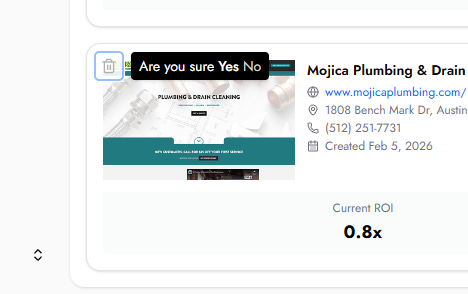
You can archive any Growth Plan directly from the Growth Plans list. To archive a plan, click the archive icon on the business card. A confirmation prompt will appear asking "Are you sure?" — click Yes to confirm. Archived plans are removed from your active Growth Plans list.
Does a business need to be an active client to appear in Growth Plans?
No. Any business that completes the Growbotik chat and generates an analysis will appear in Growth Plans, regardless of whether they have started execution. This allows you to track and follow up with prospects before they commit.
Can I view the full analysis and plan for any business in the list?
Yes. Click View on any business card to open their complete Growth Plan, including the full Analysis, Marketing Gap Analysis, Cost of Acquisition, 12-Month Roadmap, and Execute stage..
What do the service status labels mean on the Roadmap?
Each service in the monthly Tactical Objectives is tagged with one of four status labels. Launching means the service is going live for the first time that month. Continuing means the service is being maintained at its current level. Optimising means the budget or strategy for that service is being adjusted. Performing means investment in that service is being increased based on strong results.
Why is Month 1 revenue projected at zero?
Month 1 is the setup and infrastructure month. All core services are being launched and configured for the first time. Revenue generation begins from Month 2 onwards once the foundational systems are live and actively driving inbound leads.
How is the Projected ROI calculated?
Projected ROI is calculated using the business's own data — including their average ticket value, closing rate, customer lifetime value, and current lead volume — combined with Growbotik's performance benchmarks. It represents the estimated return achievable if the plan executes as designed.
How is the Cost of Acquisition figure determined?
The Cost of Acquisition figure is estimated based on the business's existing marketing performance, their average cost per click, their current conversion rates, and what Growbotik projects it will take to generate a new paying client for that specific business. It varies from business to business and is recalculated based on the data gathered during the analysis.
