Once your client buys their Wix plan through your link, we finish the website with their details, publish it, move it into their Wix account, and connect their domain. You don't need to build or publish anything in Wix.
Your client buys a Wix Light plan (yearly or longer) through your link.
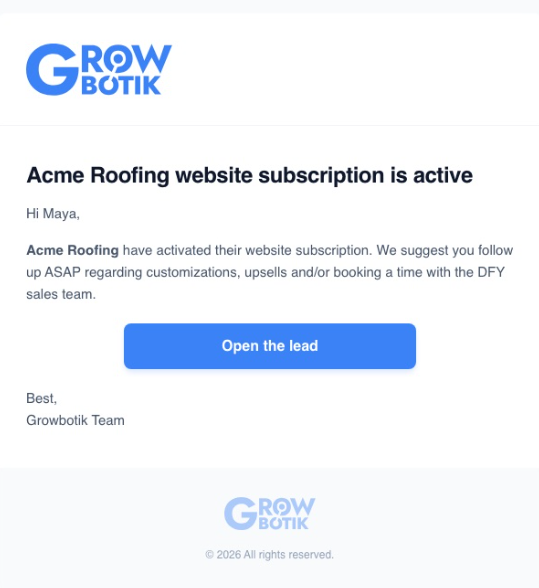
You are notified by email, and the lead converts to a business account.
Your client is invited to their Customer Hub, branded with your agency.
Your client completes one To-Do: business details, logo, photos, and a domain choice.
We finish the website, review it, and move it into your client's Wix account.
The domain is connected, whether your client already owns one or buys one on Wix.
The site is live. You follow up on customizations and upgrades.
Your part is small: make sure the sale goes through your link, and help your client finish their To-Dos quickly.
Your client buys a Wix Light plan for 1, 2, or 3 years through the I want this website button on the preview you shared. The Wix signup links on the lead page work too. Purchases made through these links are credited to you and to this lead.

To see what your client goes through at checkout, screen by screen, read How Your Client Buys Their Wix Plan. It also has a PDF guide you can send your client.
Usually within minutes of the purchase:
You get an email: "[Business] website subscription is active." It is your cue to follow up on customizations, upgrades, or a call with the Done-For-You sales team.
The lead becomes a business account under your agency. The lead page shows Converted, along with the website's progress.
Your commission appears under Earnings.
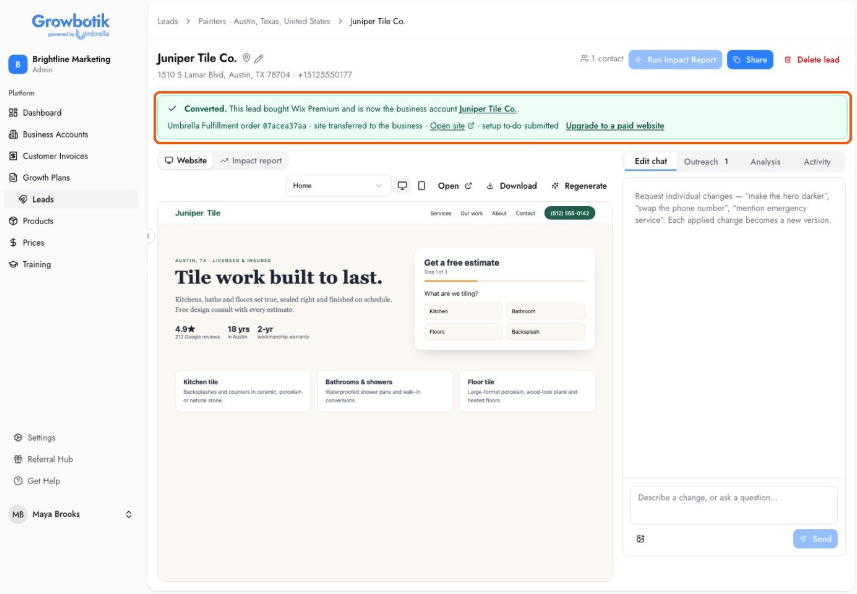
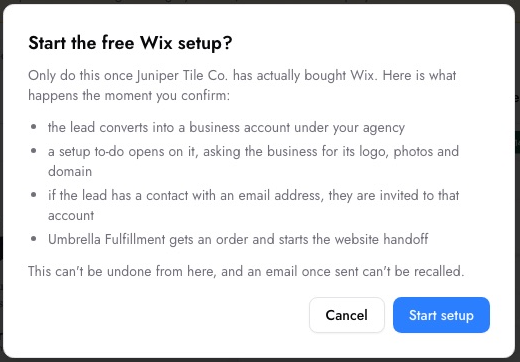
Did your client buy Wix on their own, without your link? Open the lead and click Start free Wix setup. Once you confirm, the same process starts: the lead converts, the setup To-Do opens, and your client is invited. Only do this after your client has bought their plan. Commission applies to purchases made through your link.
Your client gets an email inviting them into their Customer Hub, branded with your agency. This is where they complete their To-Dos and follow their website's progress.
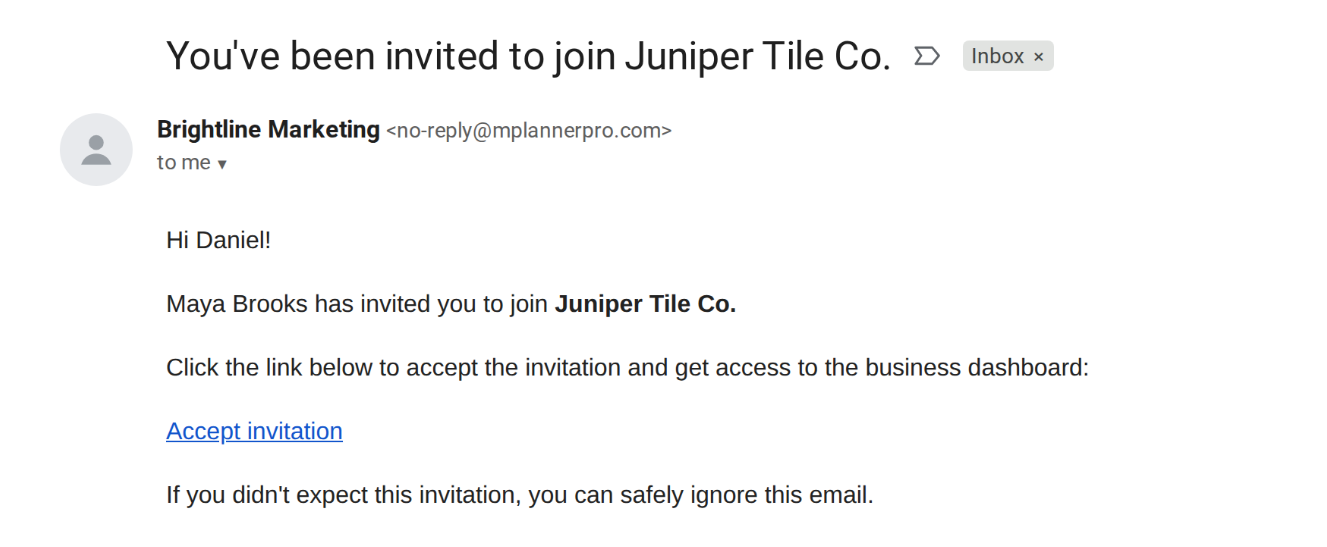
Tip: Tell your client the invitation is on its way, and ask them to check their spam folder if they do not see it. The sooner they sign in, the sooner their site goes live.
In the Customer Hub, your client opens Set up your free Wix website. It takes a few minutes:
Business Details: Business name, phone number, address, and opening hours.
Logo and Photos: Their logo, plus up to 10 photos of their team, premises, or finished work.
Your Domain: I already own a domain, I'll buy one on Wix, or No domain for now.
Anything Else? A tagline, an award to mention, a photo to leave out.
If your client has not submitted the To-Do within seven days, we go ahead with the details we have.
The free setup personalizes the site your client already previewed. Bigger changes — like more pages or a new design — are part of a paid website (see Step 7).
Our website team takes it from here. You do not need to build, copy, or publish anything in Wix.
We update the website with your client's details, logo, and photos.
We review it before anything goes live.
We publish it and move it into your client's Wix account. Wix then emails your client to approve moving the site into their account, and your client clicks Accept. The site stays online in the meantime.
We apply the hosting plan your client bought to the site.
Two things to tell your client:
Accept the site transfer from Wix. Wix sends it to the email on their Wix account, and it takes one click.
Do not buy a second plan. The Light plan they already bought is applied to the new site.
After the move, the site belongs to your client. We stay on it as a collaborator, so updates can still be made later.
What happens next depends on the domain choice your client made in their setup To-Do.
Your client keeps their domain where it is. They get a Connect your domain To-Do and an email with the exact records to add where they manage it (GoDaddy, Namecheap, Cloudflare, and others), with how-to links for common providers.
Their email and anything else on the domain keep working. They only add records — the domain does not move.
DNS changes can take a few hours to spread. We keep checking and complete the step once the records are in. Your client can also click Verify to check right away.
Your client buys the domain on Wix, signed in to the same Wix account they bought their plan with. Their Light plan includes a free domain for the first year, and no DNS settings are needed because the domain and the site sit in the same account. Your client gets a To-Do with the steps to get it connected.
The site goes live on a Wix web address. Your client can add their own domain later.
Once the domain is connected, your client's website is live in their own Wix account. You can follow each stage on the lead page, and you get email updates along the way.
This is the best moment to reconnect with your client:
Customizations and add-ons that help the site bring in business.
Upgrade to a paid website from the lead page, for more pages or a fully custom design.
A call with the Done-For-You sales team, if your client wants us to handle more for them.
My client says they bought Wix, but the lead does not show Converted.
Purchases made through your link usually show within minutes. If your client bought directly on Wix without your link, click Start free Wix setup on the lead page (Step 2). Not sure which applies? Contact support and we will check it for you.
Do I need to publish the website in Wix myself?
No. Our team publishes the website and moves it into your client's Wix account. There is nothing for you to set up in Wix.
Who owns the website?
Your client. The site, the plan, and the domain all live in the Wix account used for the purchase. Wix handles plan renewals with your client directly.
Can my client ask for design changes?
The free setup covers their details, logo, photos, and a few notes. For more pages or a new design, use Upgrade to a paid website on the lead page, or book a call with the Done-For-You sales team.
How long does it take?
Mostly as long as your client takes to complete their To-Dos. We move to the next step as soon as each one is done. If the setup To-Do sits for seven days, we continue with what we have.
My client did not get the invitation email.
Ask them to check their spam folder, and make sure the lead's contact has the right email address. Still nothing? Contact support.
My client picked the wrong plan or billing period.
Contact support right away. Wix offers a 14-day money-back guarantee, so it can still be fixed.
Can my client host the free website somewhere else, or on a free Wix plan?
No. We deliver it into your client's own Wix account, on a Wix Light plan (yearly or longer).
