Our inside sales team is a high-ticket closing team. When a lead wants more than a basic website, you can book them a call with the team. The team reviews everything you already built for the lead, such as the website and the Impact Report, takes the call, and takes the business through the sale.
The team handles larger deals such as website revamps and growth plans. It does not handle basic hosting purchases.
Only after a positive reply to the website. The usual flow is:
You reach out to the business, and they say yes to a free website.
You generate the website and send it.
They reply with something positive.
What they say decides the next step:
"I want it now." They want the website as it is. Send them the Website link from the Wix signup links bar in the lead's workspace, or let them use the I want this website button on the share page. They buy the hosting, and the website is transferred.
"I want it, but..." They want changes, more pages, or a domain, or they ask about getting more leads. Book them with the sales team, or run the call yourself.
Do not send cold or unresponsive leads to the sales team, and do not send leads that only want hosting.
Step 1: Open the lead and go to the Outreach tab.
Step 2: Under Sales notes, click Book a call with the sales team. The team's booking page opens.
Step 3: Copy the booking page link and send it to the business in your email or message.
Step 4: Write a sales note (see below) and click Add note.
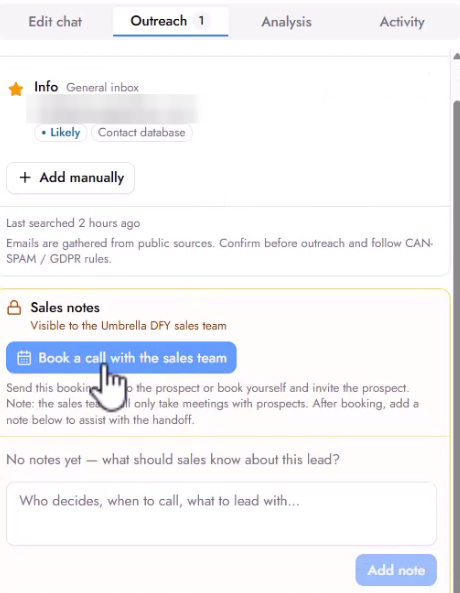
You can also book the call yourself and invite the prospect. The sales team only takes meetings with prospects.
Sales notes are visible to the sales team. The business never sees them. The team reads your note before the call, together with the website and Impact Report you created for the lead. The more context you give, the better the handoff.
Include:
What the business wants. For example: "Mike wants the website but also requested A, B, and C. He also replied to the first email about leads, so he wants that too."
The last correspondence. Paste it or summarize it, so the call picks up where your conversation stopped.
If you want to join the call. Say so, and the team will add you to the booking.
If you want to lead the call. Say so in the note, and the team will support you on the call.
If you do not say anything, the sales team takes over the call and runs it their way.
If Symphony runs the conversation with the lead, it can send the booking link for you. If you write to the business yourself, copy the link as described above. Either way, add a sales note so the team knows the story.
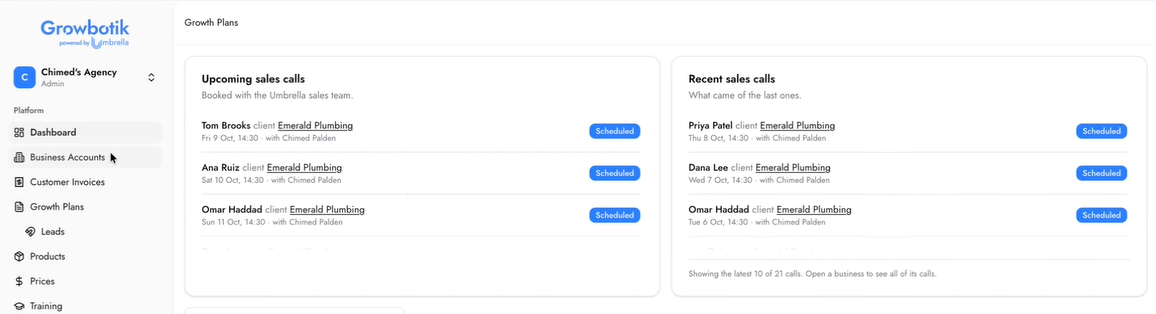
When you book a Done-For-You sales call with the sales team, you can track every scheduled and completed call directly inside your dashboard. On the dashboard page, two panels keep you up to date: Upcoming sales calls shows every call that has been booked with the sales team and has not yet taken place, and Recent sales calls shows what came of the last ones. Each entry displays the client name, the business they belong to, the scheduled date and time, and the current status.
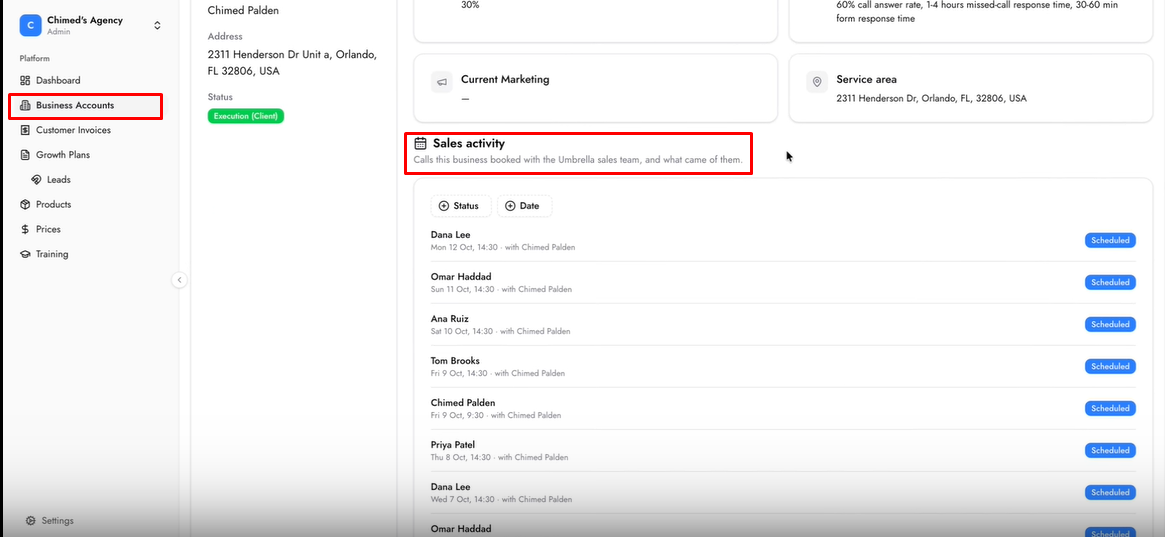
You can also view sales activity at the individual business level. Open any business from the Business Accounts page and scroll to the Sales activity section at the bottom. This section shows every call booked for that specific business, along with notes and outcomes recorded by the sales team after each call. You can sort by Status or Date to find what you need.
Which leads should I send to the sales team?
Leads who replied positively to their free website and want more than hosting, such as changes, more pages, a domain, or more leads.
Can I send a lead that only wants hosting?
No. Send them the lead's Wix Website link instead.
Where do I find the sales team's booking link?
Open the lead, go to the Outreach tab, and click Book a call with the sales team.
Can I join the call?
Yes. Write it in the sales note, and the team will add you to the booking.
Who leads the call?
The sales team, unless your note says you want to lead.
Does the business see my sales notes?
No. Sales notes are internal.
