Once you have a lead list, the next step is to decide which businesses to focus on and find their contact information. Work in this order:
Choose the businesses worth a closer look.
Analyze their websites.
Get contacts for the ones with low scores.
Do not get contacts or generate websites before you know a business is worth pursuing.
Tick the checkbox next to one or more businesses in a list to see the actions:
Analyze websites: Scores each website out of 100 and lists what is wrong with it. Always start here.
Get contacts: Searches public sources for names and email addresses at the business.
Generate websites: Builds a new website for the business. See Creating and Editing a Lead's Website.
Generate impact reports: Builds a full Impact Report and 12-month Growth Plan. See Impact Report Creation and Sharing with Prospects.
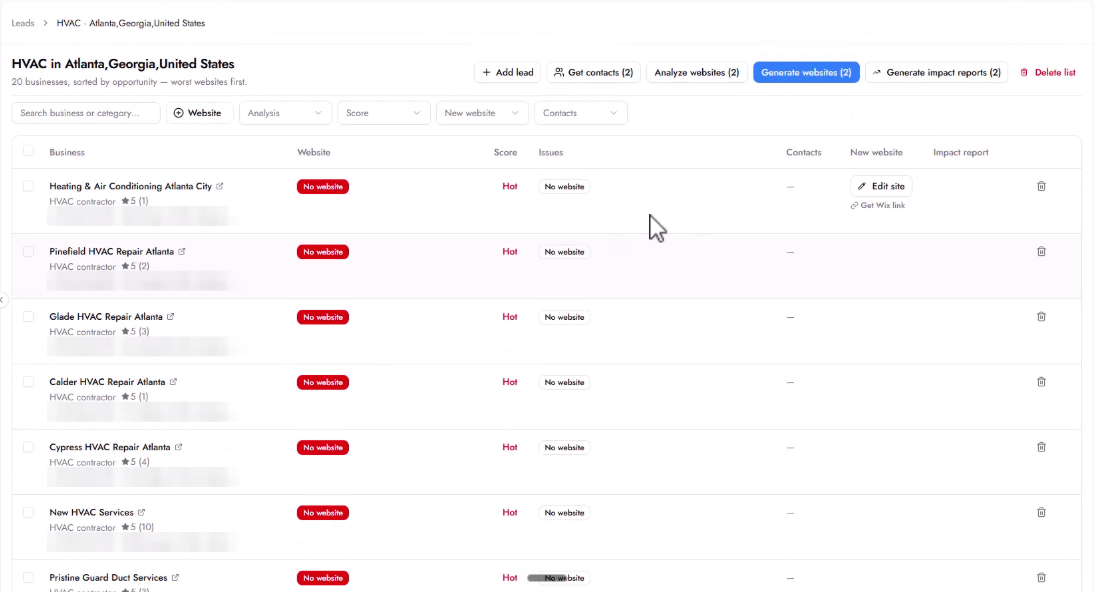
You do not need to analyze every business on the list. Look at the number of Google reviews as a signal. A business with thousands of reviews is likely already investing in marketing. A business with fewer reviews compared to its competitors may not be investing as much and could be a better lead to focus on.
If a business has no website at all (marked with a red No website badge), there is nothing to analyze. You can skip straight to getting contacts and generating a website for them.
A number in the Score column before you run an analysis comes from the system, not from an actual analysis. Ignore it.
Step 1: Tick the businesses you chose.
Step 2: Click Analyze websites.
Growbotik analyzes up to 3 websites at a time. There is no limit on the total number, so when a batch is done, select the next businesses.
When the analysis is done, each business shows a score out of 100 with the label Analyzed, and a short description of what is wrong with its website. Click the arrow at the end of the row to read the full summary. You can copy it from there.
The issues are specific, for example no booking widget, no chatbot, or no clear call to action at the top of the page. If you use Symphony, it uses the same findings when it writes to the business, so your outreach references real issues found on their website.
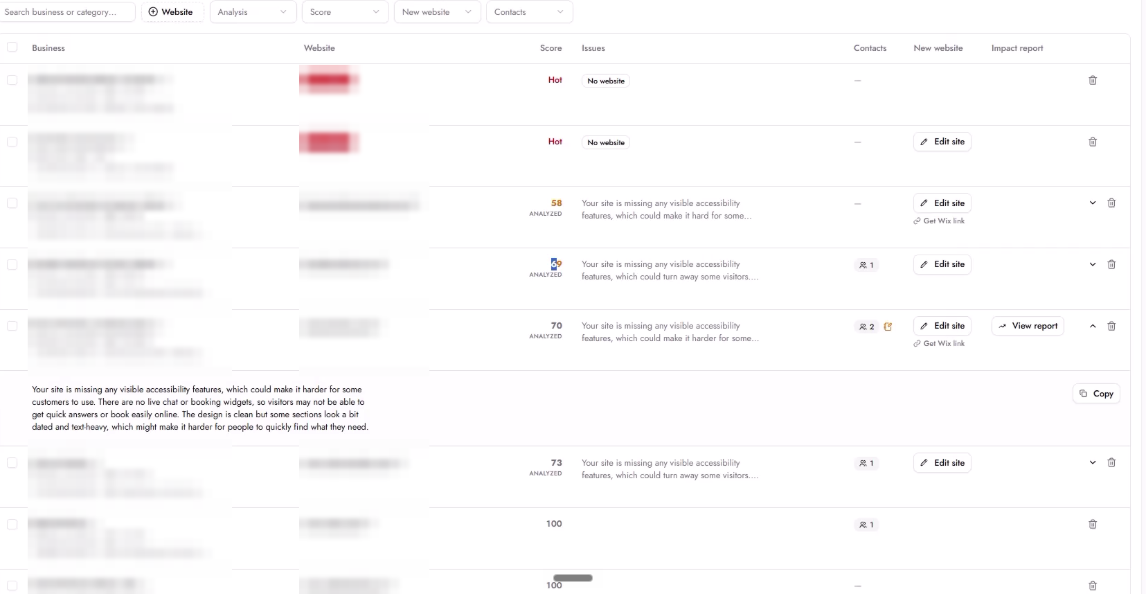
Up to about 75: The website has clear areas for improvement.
Close to 80: The website is already fairly functional. The gap between the current site and a new one is smaller.
Step 1: Tick the businesses with low scores, and any businesses with no website.
Step 2: Click Get contacts.
Growbotik searches public sources for contacts. This is usually quick. The number of contacts found appears in the Contacts column. Open the lead and go to the Outreach tab to see each contact's name, role, and email.
What to expect:
Sometimes Growbotik finds a person, such as [email protected]. Sometimes it only finds a general address, such as [email protected]. A general address is a fine place to start. In many small businesses, it goes straight to the owner.
Growbotik does not find contacts for every business, especially very small or new ones.
Emails are gathered from public sources. Confirm them before you reach out, and follow CAN-SPAM and GDPR rules.
Look for an email address or a contact form on the business's website and Facebook page.
If you find a contact, add it to the lead by hand in the Outreach tab.
You can also reach out through the website's contact form or a Facebook message.
If you use Symphony, remember that it only picks up leads that have an analyzed website and at least one contact.
Should I get contacts for every business on my list?
No. Analyze websites first, and get contacts only for businesses with low scores or no website.
How many websites can I analyze?
As many as you want. Growbotik analyzes up to 3 at a time, so select the next batch when one is done.
Why did Get contacts find nothing?
Small and new businesses often have no public contact details. Check their website and Facebook page, and add a contact by hand if you find one.
Is an info@ email good enough?
Yes. In small businesses, it often reaches the owner.
What do the scores mean?
Up to about 75 means the website has clear room for improvement. Closer to 80, the website is already fairly functional. The score helps you prioritize which businesses to focus on first.
