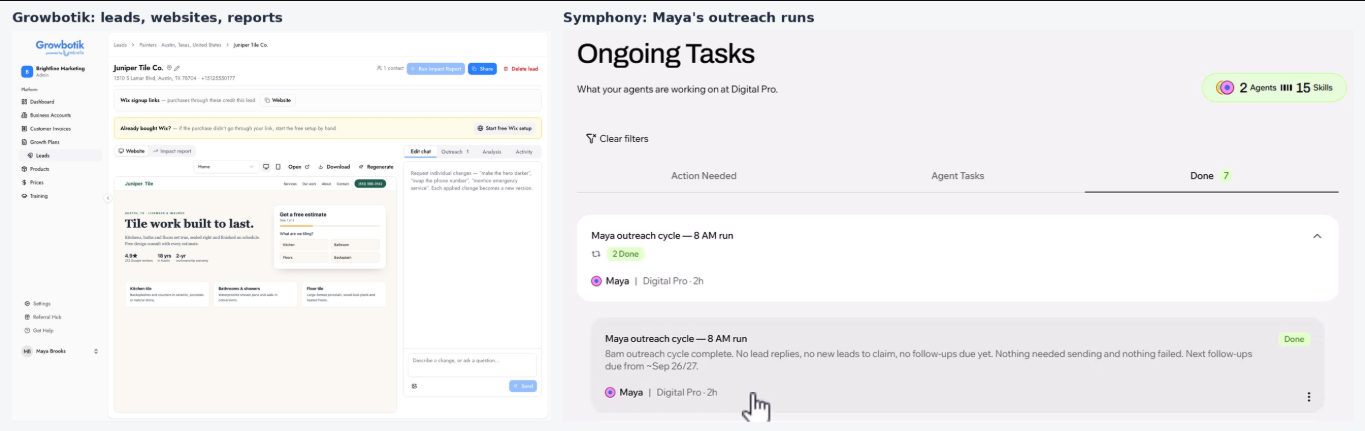
Growbotik and Symphony work as one prospecting system. Growbotik finds local businesses, scores their websites, finds their contacts, and builds your prospecting assets: a new website and an Impact Report. Symphony takes those leads, emails them, follows up, and replies on your behalf, all the way to a booked call or near-sale.
You do not need to be technical to use it. The Growbotik setup pack builds everything inside Symphony for you. This article explains how the pieces fit, so you know what each system does and where to look when something does not go as planned.
A Growbotik account.
A paid Symphony account, purchased through wb.growbotik.com (yearly plan). The same purchase activates Leads in Growbotik.
An email mailbox on your own business domain, such as [email protected]. Prospecting from a generic address like [email protected] is not recommended. If you need a domain, you can get one at domain.growbotik.com.
Growbotik is where every prospecting asset is created:
Leads: Local businesses in a niche and city, pulled from Google Maps.
Website Analysis: A score out of 100 that shows whether a business's website is converting effectively or needs improvement.
Contacts: Names and email addresses found for the business.
Websites: A complete new website for the business, generated in one click.
Impact Reports and Growth Plans: A 12-month marketing plan that shows what the business needs to reach a specific goal of new clients, generated in one click.
Growbotik is also the "CMO brain." When a business buys a marketing plan, Growbotik runs the fulfillment. It also tells Symphony what to do at every step of the outreach.
Symphony is the communication arm. It:
Fetches new leads from Growbotik several times a day.
Sends the first email and follows up with leads who do not respond.
Reads replies. When a business responds positively about receiving a new website, Symphony requests the website from Growbotik and then emails the business the link.
Replies to questions and continues the conversation until the business books a call or reaches a near-sale stage.
Every step can be automated, but none of them has to be. You can also do everything manually. For example, if you only need to send a single Impact Report, generate it in Growbotik and email it yourself. You do not need Symphony for that.
Maestro: Symphony's main agent. Every time you open Chat in Symphony, you are talking to Maestro. It manages your other agents, and you can ask it for status updates or help when something does not work.
Maya: Your prospecting agent, created automatically when you install the Growbotik setup pack. Maya claims new leads from Growbotik, sends first-touch emails from your connected email, follows up with leads who go quiet, and replies to leads who write back.
Reviewer: A sub-agent that checks the text Maya writes before it is sent. Symphony requires every agent that writes outgoing text to have a reviewer.
Pulses: Small scheduled routines. One wakes Maya up for an outreach cycle every few hours during business hours. The other checks for replies every hour. They are built as lightweight functions and use very few credits.
Maya connects to Growbotik through the Growbotik MCP. An MCP is a connector that lets AI agents use tools and information from another system. Through it, Maya accesses two kinds of items:
Policies: Instructions that tell Maya what to do — when to reach out, how to write an email, what not to say, and how to handle a reply. Think of them as standard operating procedures (SOPs).
Tools: Actions Maya can take in Growbotik, such as fetching a lead list or requesting a website to be generated for a lead.
Most multi-agent systems require you to write and maintain long instruction documents yourself. The Growbotik setup works differently. Maya is kept lightweight inside Symphony. One of her core instructions is to ask Growbotik for her outreach run plan every time she wakes up, and that plan tells her what to do.
This means the Growbotik team manages Maya's instructions from one place. When improvements are made — such as adjusting the number of follow-ups or the approach of the emails — the policy is updated once in Growbotik, and every member's Maya starts working the new way automatically. You do not need to change anything on your end.
You can also build agents that you control yourself. Ask Maestro to create a new agent, give it a clear name that is different from your other agents (for example, Alex), and give it your own instructions. You can run your own agents alongside Maya. See Beyond Automated Prospecting for an example.
Growbotik is responsible for leads, contacts, website scores, websites, and Impact Reports. If one of these is missing or not working correctly, start in Growbotik.
Symphony is responsible for the emails and communication. If an email did not go out or a reply was not handled, start in Symphony.
Do I have to use Symphony to prospect with Growbotik?
No. Every step can be done manually in Growbotik: find leads, analyze websites, get contacts, generate websites and Impact Reports, and send them yourself. Symphony automates the outreach.
Do I need to write prompts or instructions for Maya?
No. The setup pack creates Maya for you, and her instructions come from Growbotik. The Growbotik team keeps them up to date for all members.
Is Symphony a Growbotik product?
No. Symphony is an AI agent platform by Wix, and your Symphony subscription is with Wix. Growbotik has a collaboration with Wix that allows Growbotik policies to manage your prospecting agent.
Can I change how Maya writes?
Maya's outreach rules are shared by all members and managed by the Growbotik team. If you want a different approach, create your own agent in Symphony and give it your own instructions. If something in Maya's emails is not working for you, contact the Growbotik support team. Member feedback is how the outreach rules are improved for everyone.
What is an MCP?
A connector that lets AI agents use tools and information from another system. The Growbotik MCP is how your Symphony agents read Growbotik policies and use Growbotik tools. You connect it once during setup.
