The Impact Report is the first screen the prospect sees after completing the Discovery Chat. It leads with a clear outcome statement — how many clients Growbotik can generate, at what cost per lead, and what that translates to in revenue — then backs it up with a full marketing gap analysis across every channel. The report is produced automatically from the data gathered during the chat and the live analyses that ran inside it.
The Hero Statement
At the top of the Impact Report, a hero statement summarizes the entire opportunity in one paragraph. It states how many clients Growbotik can generate per month, how many leads per month that requires, the average cost per lead, the projected year-one revenue, and the projected lifetime revenue from those clients.
This is designed to give the prospect immediate clarity on whether the opportunity is worth pursuing — before they look at any detail.
Editable Client Target
Below the hero statement, the prospect's requested number of clients per month is displayed with an Edit button. Changing this number recalculates the entire report — leads per month, cost per lead, revenue projections, and the growth plan downstream. The cost per client is also shown. This allows the prospect or agency to explore different scenarios in real time.
Marketing Gap Snapshot
Below the client target, a grid of score cards shows every marketing channel that was analyzed. Each card displays the channel name, an icon, and a score out of 100. The channels shown are: Speed to Lead, GEO, Reviews, Near Me SEO, Business Listings, SEO Performance, Google PPC Ads, Website Accessibility, Facebook Brand Awareness, and Website Conversion.
Clicking any score card opens the detailed breakdown for that channel.
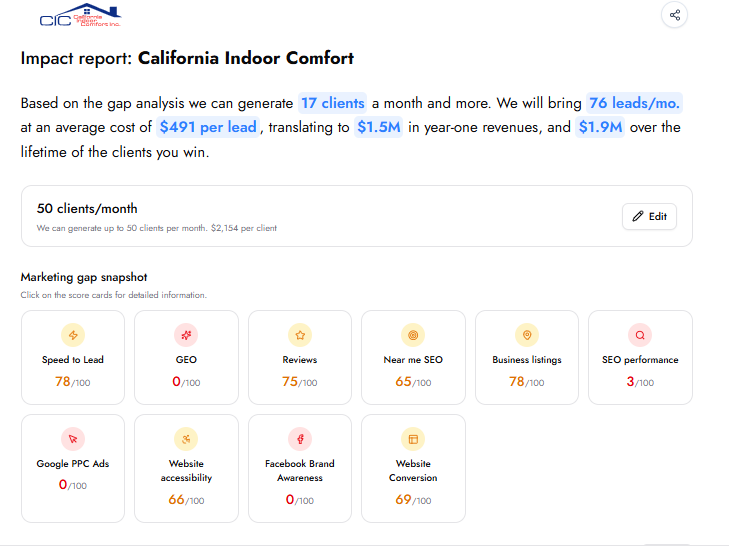
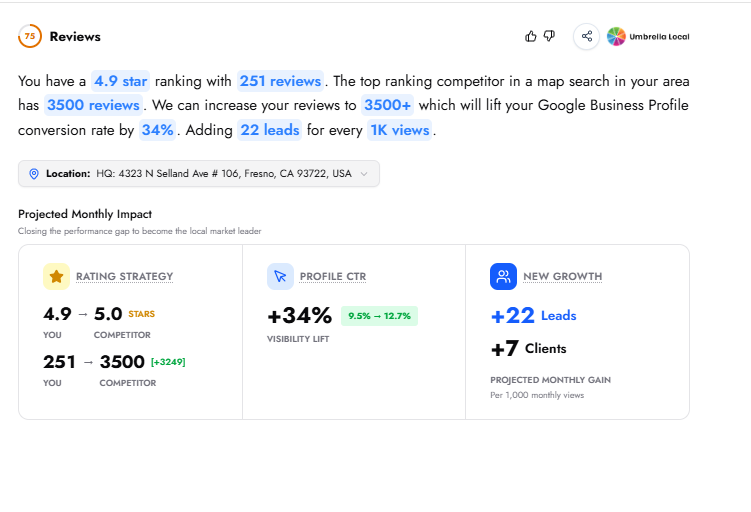
Each channel's detail page opens with a score and a banner text that summarizes the gap and the opportunity in a single paragraph — giving the prospect the key takeaway at a glance.
Below the banner, a Projected Monthly Impact section shows what closing the gap would mean for the business. This is broken into metric cards that vary by channel — for example, the Reviews detail page shows a Rating Strategy card comparing the prospect's star rating and review count against the top local competitor, a Profile CTR card showing the projected visibility lift, and a New Growth card showing the projected monthly gain in leads and clients.
The specific metrics and layout differ from channel to channel, but the structure is consistent: a banner text explaining the issue, followed by projected impact figures that quantify the opportunity.
These findings give you concrete, defensible talking points. Instead of pitching in vague terms, you present clear evidence — this is the gap, and this is its potential value.
Before meeting a client, review the analysis. Each section is clearly explained, with gaps and their projected impact laid out. Your role is to guide the client through these and connect them to the recommended next steps.
The Impact Report turns the Discovery Chat analysis into a single-page summary that leads with outcomes — clients, leads, cost per lead, and revenue — then backs it up with scored gap analysis across every marketing channel. Each channel has a detail page with specific findings from the live analysis. The client target and business data are both editable, allowing you or the prospect to explore different scenarios in real time. From the Impact Report, the prospect proceeds to the 12-Month Growth Roadmap.
Use the Share button and send that link. A link copied from your browser's address bar asks for a login.
Yes. Run the chat with your own email, review the report, then use Share to send it to the prospect.
